Built for Canadian retail.
End to end.
From the moment a customer walks in to your monthly financial close — Cloud Mobile POS handles it all in one platform.
Point of Sale
A POS terminal built for speed and simplicity.
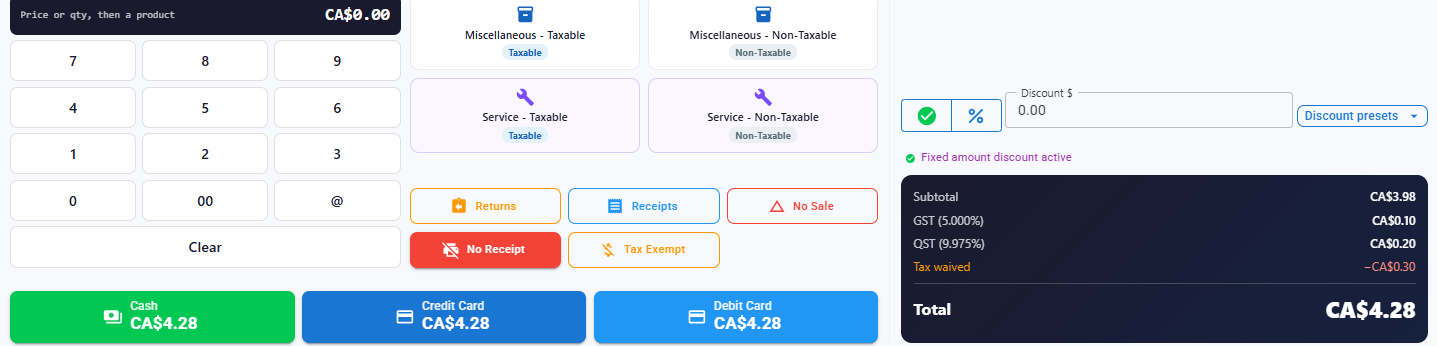
Touch-friendly, fast, and connected to your inventory in real time. Checkout, returns, cash sessions, and Canadian taxes — all in one screen.
POS Terminal
Search products by name or barcode, manage the cart with quantity controls, apply order-level and item-level discounts, add order notes, and select a payment method. Supports Cash, Card, and Stripe Terminal.
- Lightning-fast product search
- Order + item-level discounts
- Age restriction warnings
- Order notes and references
- Receipt printing
Returns & Refunds
Select any past order, choose items to return, and inventory is automatically restored. Orders are marked Refunded or Partial — no manual stock adjustments needed.
Cash Session Management
Open sessions with an opening float and close with a counted total. View discrepancies, see active sessions across registers, and access full session history.
Multiple Registers
Add and assign as many cash registers as your locations need. Each register tracks its own sessions independently. Built for multi-lane or multi-location setups.
Canadian Tax Engine
Federal GST and provincial PST applied per product, per province — automatically. Tax compliance is built in, not configured after the fact. Receipts are always correct.
Stripe Terminal
Card-present payments via Stripe Reader. Semi-integrated setup keeps your workflow fast and your hardware costs low. No separate payment terminal software required.
Receipt Printers & Scanners
Configure thermal receipt printers, barcode scanners and cash drawers per warehouse. Set paper width and codepage, assign a default printer, and watch the print queue — or let the cashier choose Receipt or No Receipt on the till.
Cash Drawer Log
Every drawer opening is recorded with its reason, the user who opened it and the order it belonged to. Emergency and test opens are counted separately, so an unexplained drawer is easy to spot.
Your POS doesn't exist in isolation
Every transaction updates inventory, logs movement history, and feeds your financial dashboard automatically.
Inventory syncs on every sale
When a product is sold, stock is decremented across the right warehouse instantly. No separate inventory step required.
Returns restore stock automatically
Process a return and stock is added back without touching the inventory screen. The movement log records every transaction.
Revenue flows to reports
Every transaction feeds your financial dashboard, sales summary, and tax report in real time. End-of-day is already done when you close your session.
Inventory Management
Real-time stock across every warehouse, with a full audit trail.
From product setup to warehouse transfers — everything you need to know what you have and where it is.
Multi-Warehouse Stock
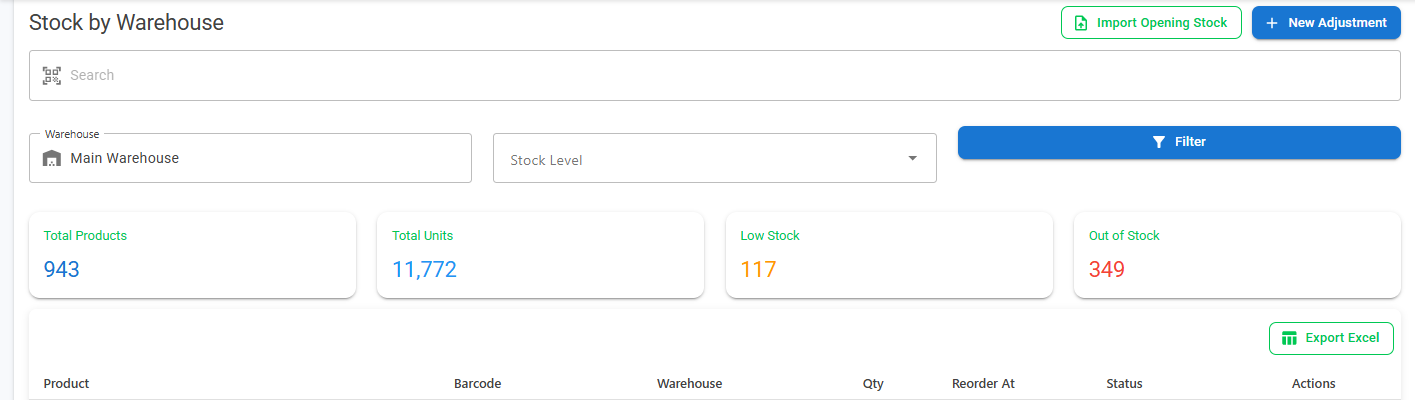
View stock levels across all your warehouses in a single screen. Filter by location, product, or status. Make manual adjustments with a reason log. Export to Excel for your accountant or operations team.
- Per-warehouse stock view
- Unified total across all locations
- Manual stock adjustments with reason codes
- Excel export
Products & Categories
Add products with images, pricing, categories, tax settings, and age restriction flags. Supports whole and decimal quantity display based on your business type.
Stock Movements Log
Every inventory in and out is logged with a reference number, timestamp, source (sale, return, PO, adjustment), and user. Your inventory is always explainable.
Low Stock Alerts
Set minimum stock thresholds per product. The dashboard surfaces low-stock items immediately. Know what needs reordering before your shelves are empty.
Product Images
Upload product photos stored securely on Cloudflare R2. Images appear in POS search results for faster identification by your cashiers and staff.
Product Variants
Sell one product in several forms — sizes, strengths, flavours — each with its own barcode, price and stock level, grouped under a single parent so the catalogue stays readable.
Multiple Barcodes per Product
A product can carry more than one barcode, so a repackaged case, a supplier's label and your own all scan to the same item instead of becoming duplicate SKUs.
Price & Shelf Labels
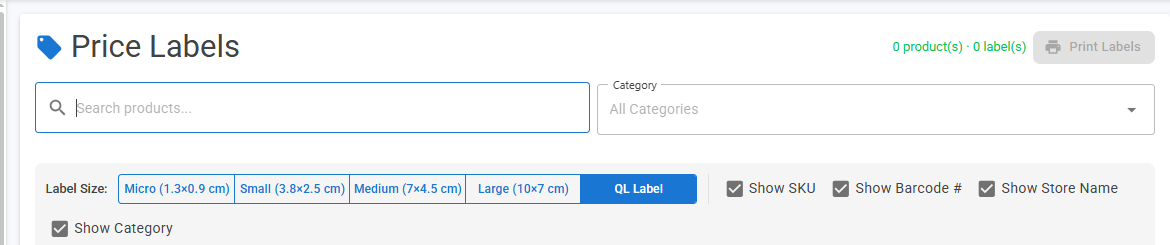
Print price labels in five sizes — Micro 1.3×0.9 cm, Small 3.8×2.5 cm, Medium 7×4.5 cm, Large 10×7 cm and QL — choosing per run whether to show the SKU, barcode number, store name and category.
Import Opening Stock
Start with the stock you already have rather than keying it in. Import opening quantities per warehouse, then let sales, returns and receiving take over.
Inventory that updates itself
Stock levels change automatically as you sell, receive, and return — no manual sync needed.
Purchasing
Streamline your supplier relationships and stock replenishment.
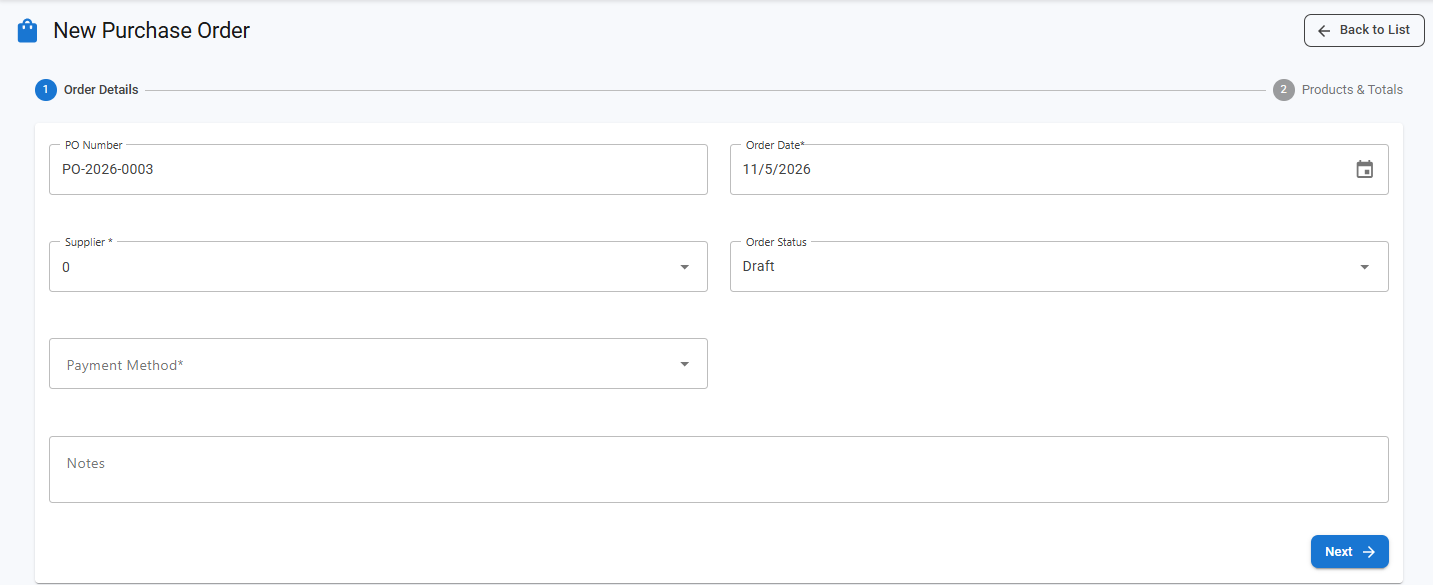
Purchase Orders
Create, edit, and manage POs with a Draft → Ordered → Received status flow. Filter, search, and export to Excel.
Receive Stock
Two-step receiving workflow: select a PO, enter received quantities. Inventory updates automatically and last purchase costs are tracked per product.
Suppliers
Maintain a full supplier directory with contact details. Supplier history is linked directly to your purchase orders.
Last Purchase Cost
Always know what you last paid. Cost hints appear inline when creating new POs so you can spot pricing changes immediately.
Sales
Customer orders, promotions, and everything in between.
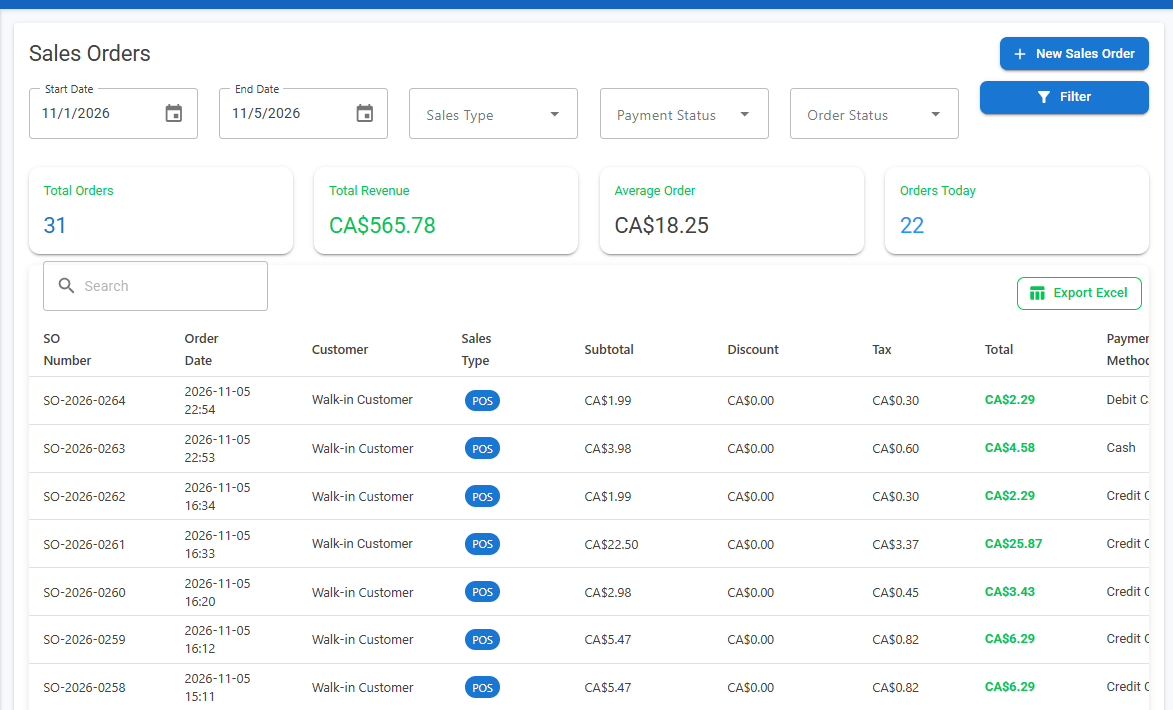
Sales Orders
Create and manage sales orders with customer selection, line items, specials auto-apply, and full totals. Export to Excel with one click.
Customers
Maintain a customer directory tied to your sales history. Add, edit, and remove customers with full order traceability.
Specials & Promotions
3-step wizard to create promotions: set the info, choose products, define the discount (fixed amount or percentage). Promotions auto-apply at POS and on sales orders.
Print Specials
Generate a printable special sheet directly from any promotion. Useful for shelf labels, flyers, and in-store signage.
Finance & Expenses
Keep expenses organized and understand your bottom line.
Expense Tracking
Log business expenses by category and date. Filter and review spending over any period to understand where your money is going.
Expense Categories
Create custom categories to match how your business tracks costs — rent, utilities, supplies, labour, and more.
Payment Methods
Define and manage accepted payment methods for your store. Activate or deactivate methods as your needs change.
Financial Dashboard
Admin-only overview of revenue, total spend, and net income. Understand your profitability without needing a spreadsheet.
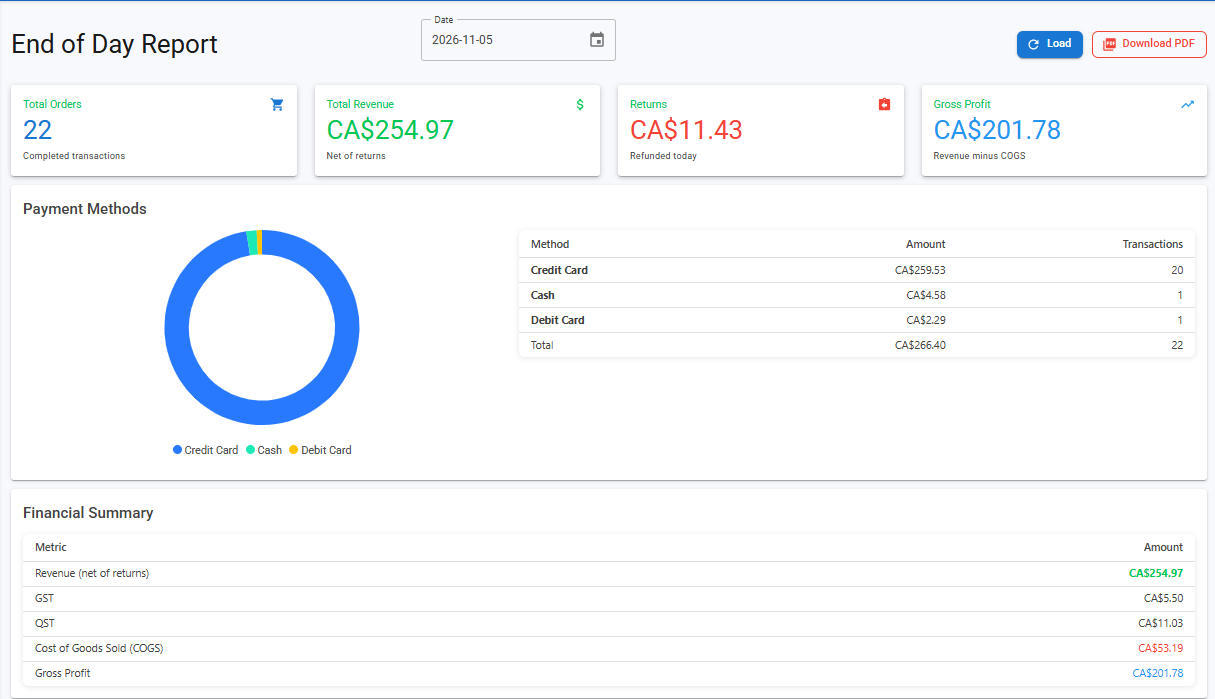
End-of-Day Close & Z-Report
Close the day in one report: orders, revenue net of returns, gross profit against cost of goods, and takings split by payment method — downloadable as PDF. Closing a cash session emails a Z-report with the drawer reconciled, opening float to counted total, and any variance flagged.
Reports & Analytics
Data that drives decisions. No spreadsheets required.
Revenue, cost, tax, and stock in one place — built for Canadian retailers. Understand your business without leaving DMD.
Sales Transactions
View all transactions for Today, Yesterday, This Week, This Month, or any custom date range. Drill into any order directly from the list.
Sales Summary
Aggregate units sold, revenue, discounts applied, and taxes collected over any period. One screen, all the numbers that matter.
Product Profitability
See which products are your best margin performers and which are underperforming. Make smarter purchasing and pricing decisions.
Net Income Report
Revenue minus expenses, broken down by period. Understand profitability without leaving the platform.
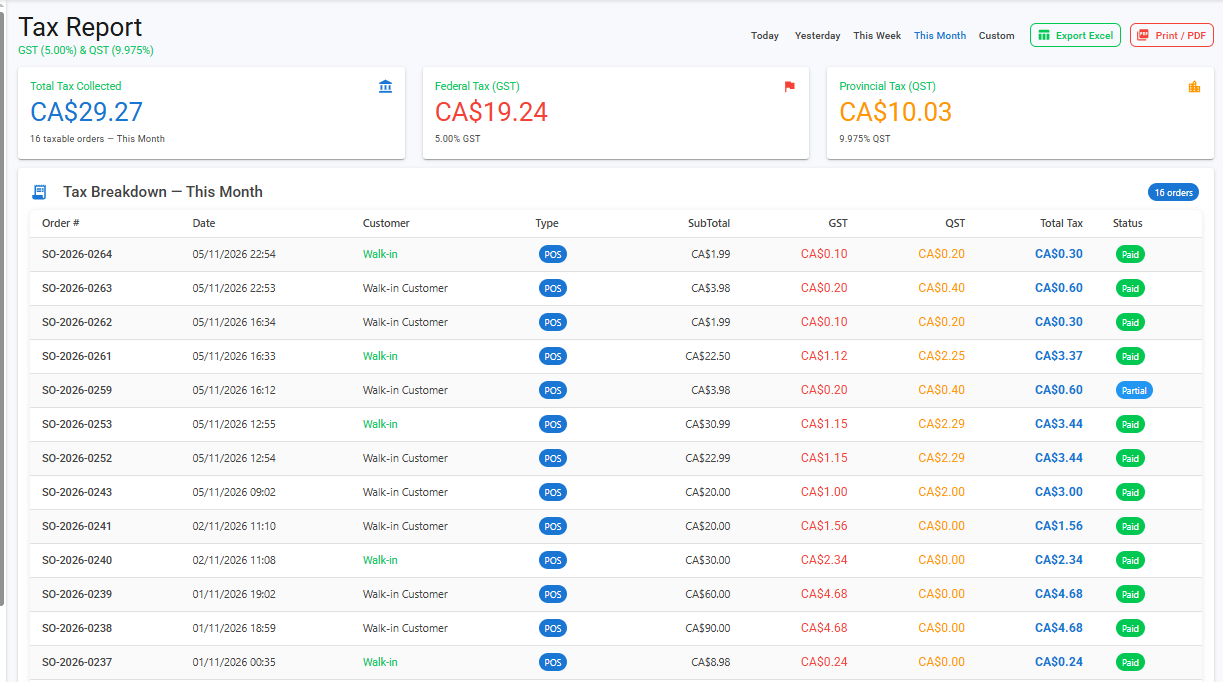
Tax Report
GST and provincial PST collected over any date range, broken down by rate. Export to Excel for your accountant or CRA filing.
Inventory Valuation
Current stock value across all warehouses based on last purchase cost. Essential for year-end and regular profitability reviews.
Low Stock Overview
Dashboard view of all products below their reorder threshold. Know what to reorder before stockouts affect sales.
Excel Exports
Export purchase orders, sales orders, and stock data to Excel. Every report that can be exported has a one-click download.
Platform & Access Control
Built for teams, franchises, and multi-location operators.
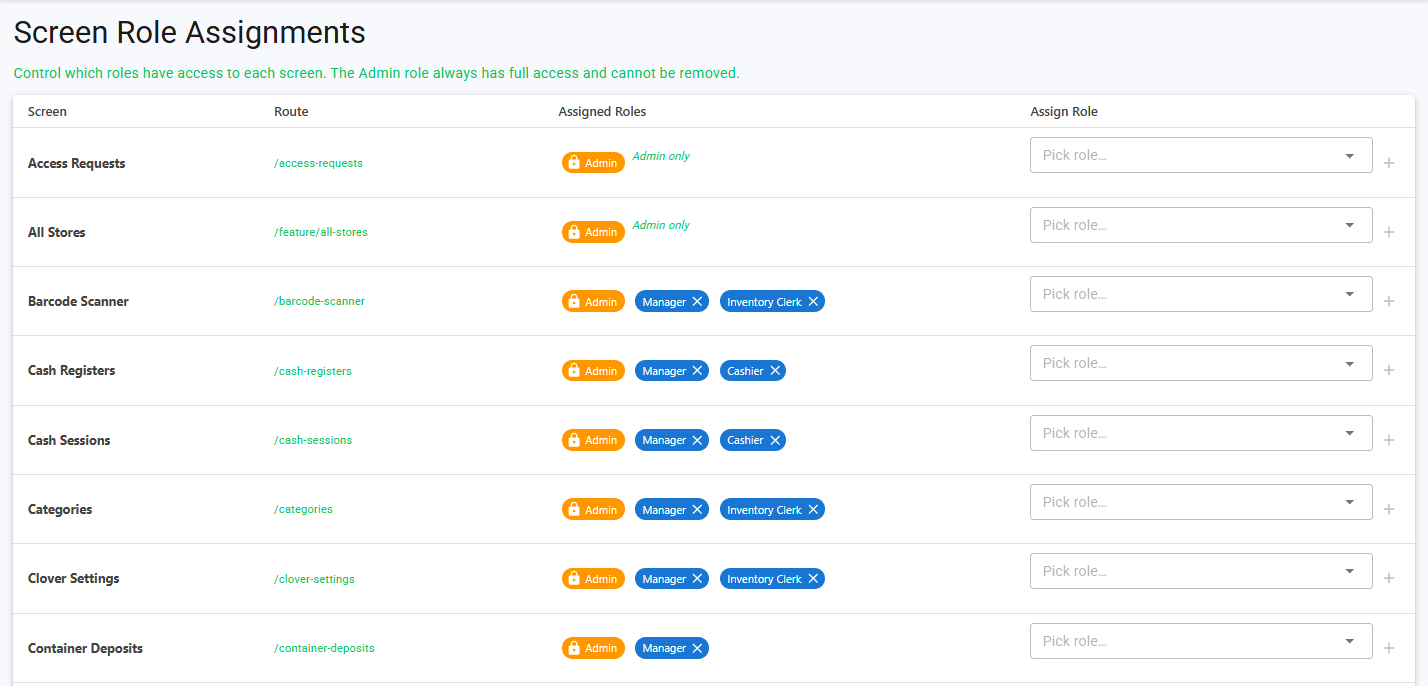
Role-Based Access
Create roles, assign users, and control exactly which screens each role can see. Cashiers see POS; managers see reports; admins see everything.
Multi-Tenant Architecture
Each business runs in its own isolated database. Your data never touches another tenant's. Built for franchises and resellers.
Multi-Language
Full support for English (CA), French (CA), and Arabic (SA) with RTL layout. Built for Canada's diverse workforce.
Timezone-Aware
Every date and timestamp respects your configured timezone. Reports and sessions always reflect your local business hours.
System Settings
Configure store name, address, timezone, and business type. Whole vs decimal quantity display adapts to your industry automatically.
Audit Trail
Every record carries CreatedAt, CreatedBy, ModifiedAt, and ModifiedBy. Full accountability across your entire operation.
Ready to see it in action?
14-day free trial. No credit card required. Set up in minutes.